Showing posts with label working from home. Show all posts

Tuesday, June 2, 2009

Go ahead, leave work earlier today. It’s a holiday.

Today is the 5th annual “Leave the Office Earlier” day. No, we’re not making this up, you can read the press release.

Productivity expert and best-selling author, Laura Stack created the holiday based on the idea that most employees are dealing with increasingly heavier workloads by spending significantly more time at work. “Leave the Office Earlier” day is a way to get employees and employers to agree to limit their time at the office to eight hours, at least just for a day.

New productivity statistics show that most of us could probably use a break. During the first quarter of 2009, U.S. workers, who are already the most productive in the world, improved productivity by 1.1 percent in the business sector, according to the U.S. Bureau of Labor Statistics.

"Given today's economy, the eight-hour work day will probably remain a myth to working Americans for the foreseeable future," says Stack. "June 2nd isn't about playing hooky or ditching work sooner. It's an opportunity for people to focus on changing work patterns, adjusting priorities, and engaging in conversations to find ways to achieve work/life balance while improving workplace productivity."

Another study by Corporate Voices for Working Families, revealed that workplace flexibility benefits employers and individual employees in such areas as productivity, customer service, employee work-life effectiveness, stress and well-being.

Eight out of ten employers and employees surveyed also said flexibility is important to recruitment and retention. Additionally, flexible schedules and innovative time-off policies help companies become an “employer of choice” for younger workers, according to the study.

Whether you think it needs an official holiday or not, workplace flexibility is quickly growing as a popular benefit that many job hunters in today’s labor market are looking for. But with the recession thinning out offices and putting more work on a smaller group of employees, some are finding it harder than ever to take that much-needed break.

Maybe a holiday like “Leave the Office Earlier” day is exactly what we need. What do you think?

Will you be participating in “Leave the Office Earlier” day? Do you think we should recognize the day each year? Or do you think we should stop watching the clock and get back to work?

Thursday, November 13, 2008

Employee security training: Spam 101

Security researchers estimate that cyber criminals send between 3,000 and 10,000 unique pieces of malware - viruses and other types of malicious code - a day. The number of attacks on businesses is growing, with the amount of spam in the workplace expected to increase 300% from 2007.

Spam management costs U.S. businesses more than $71 billion annually in lost productivity, about $712 per employee, according to a study released last year by Nucleus Research.

With the rate at which cyber criminals develop malware, security software “really isn’t blocking a heck of a lot,” said Gartner Analyst John Pescatore in a Wall Street Journal article.

As soon as software developers find a way to protect businesses from spam, cyber criminals quickly find a way to get around it.

Until security software works perfectly, there’s only one surefire way for businesses to adapt to internet security problems - training employees on the dangers of spam.

“Make sure individual workers fully understand the value of the data they work with day in and day out, and the techniques that cyber criminals use to try to steal those data. Until then, security software will just be a Band-Aid on a gaping wound,” advises Ben Worthen in a WSJ blog.


Sophos, a developer and vendor of security solutions, advises businesses to follow a set of best practices to defend against viruses, spyware and adware:

  1. Use anti-virus software. Install anti-virus software on every computer in the office and ensure virus definitions are kept up to date. Also remember to protect computers used by employees working from home.

  2. Set filters. Set email filters to block files that often contain malicious code, including EXE, COM, PIF, SCR, VBS, SHS, CHM and BAT file types. Block files with multiple extensions, for example LOVE-LETTER-FOR-YOU.TXT.VBS. Route any code sent to your organization through your IT department to check and approve that the files are safe.

  3. Educate workers on the latest virus threats. Stay up to date on the latest virus threats and educate employees on the dangers of spam so everyone knows what to look out for.

  4. Use firewall protection. Every computer in your organization connected to the outside world should be protected from internet threats with firewalls, including computers used by remote workers.

  5. Install the latest software patches. Stay up-to-date on the latest patches issued by software developers that resolve security loopholes and issues.

  6. Develop a back-up system. Make regular backups of important work and company data and store it in a safe location, possibly off-site in case of a disaster.

  7. Establish an anti-virus policy. Develop a company-wide anti-virus policy as a preventative safety measure. Educate workers on the importance of following the policy and who they should go to with security questions.

For a full overview of how to protect your business from the dangers of malware and viruses in the workplace, read Sophos’ full article on ways to defend against viruses, spyware and adware.


Related posts:

Employee security training: How to catch ‘phish’

Disaster planning: Would your company sink or swim?

Wednesday, October 8, 2008

Telecommuting = Productivity, healthy employees, more money

If you’re noticing more of your coworkers coming to work angry everyday or heightened tensions around the office then the latest survey results from the American Psychological Association may not surprise you:

More than 8 out of 10 Americans are significantly more stressed about their personal finances and the economy than ever before.

“Half of the respondents in the survey said they are increasingly stressed about their ability to provide for their family's basic needs. More than half, 56 percent, expressed concerns about job stability. This has translated into less productivity at work, because of anxieties about salary, heavy workload and job security,” as reported on CNN.


With money woes in most employees’ lives and businesses trying to save money, you would think more would be using telecommuting programs to save money on both sides.

Companies who offer employees telecommuting options find greater employee productivity, lower operating costs, improved employee health and higher retention rates, according to recently released telecommuting statistics from the Computing Technology Industry Association (CompTIA).

The latest telecommuting statistics from CompTIA’s research show:

  • 67% of companies polled said employees were more productive, mainly because they spent less time commuting.
  • 59% reported having saved money from reduced use of office-related supplies and resources.
  • 39% reported easier access to a more qualified staff located in other regions.
  • 37% said telecommuting improved employee retention.
  • 25% reported better employee health, citing lower stress levels by eliminating commuting.
  • Companies cited other benefits including promotion of safety through reduced highway use (18%) and environmental benefits (17%).

Whether your company offers telecommuting as a part-time or full-time option, you now have evidence that it protects the bottom line while lightening employees’ financial burdens. It’s a win-win situation.

Here are some resources to help get your telecommuting program off the ground:

Top 5 reasons to let employees telecommute - The Chief Happiness Officer

5 most common telecommuting mistakes - HR Tech News

Telecommuting: Getting bosses on board - BusinessWeek

Managing Telecommuters - Chapter 573.2 - The Future of Work Weblog

Wednesday, September 24, 2008

De-stress at work and encourage innovation

The economy is in bad shape. So bad even Warren Buffett is worried.

Whether its the falling dollar, gas prices or debt, our country’s financial problems have all of us pretty stressed out these days. Aside from some of the more violent effects of a bad economy on the workplace, stress has a direct impact on employee productivity and your bottom line.

According to the 2007 “Stress in America Report” by the American Psychological Association, more than half of Americans said they are less productive at work as a result of stress.

From Entrepreneur.com:

“All that stress adds up to an estimated $300 billion a year in costs for U.S. businesses due to absenteeism, decreased productivity, employee turnover, and medical, legal and insurance fees.”

On top of the economy, the bleak medical benefits situation in the US is stifling innovation. As medical premiums and medical deductibles rise, more money is taken out of paychecks and people have less money to spend. Innovation is difficult to find when employees are overwhelmed with medical bills.

While we can’t change our country’s health care system or improve the economy overnight, we can do something to help lessen employee stress at work. Get their minds off their finances and focused on innovation, and you’ll start seeing happier, more productive employees with better ideas coming out of your company.

A few ideas to de-stress employees and spark innovation:

Start a Fantasy Football league. It’s helped some big companies like NuVox motivate their staff and build teamwork. Some friendly office competition that doesn’t take employees away from their work for too long can help alleviate stress.

Start a skunkworks program or innovation league. It’s hard to get businesses to take risks in a bad economy. Sideline any fear of risk and start a company within your company (called Skunkworks) where innovation is encouraged. Once all of the “real” work is done, get together with the skunkworks team to innovate and empower employees. It can be as little as four hours a week, or more depending on how much time is available.

Start an employee wellness program. Regular exercise improves health and reduces stress. Start a weekly walking program or make a deal with a local gym for discounted employees memberships, and get employees moving. Healthier employees make less trips to the doctor, reducing medical costs and insurance rates.

Start telecommuting. Allow employees to telecommute for part of the week. Just reducing an employee’s weekly commute by one day can make a big dent in how much they spend each month in gas. By spending less money commuting to the office, employees will have one less thing to worry about financially.


Unless you have $800 million in your back pocket, no one is going to solve the nation’s financial crisis anytime soon. Until the economy begins to turn around, all we can do is work to mold company cultures to help de-stress employees and encourage innovation.

Monday, August 25, 2008

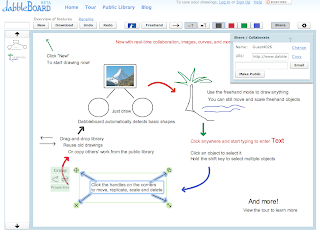
Dabbleboard: New online collaboration tool

Want to think and communicate visually with remote employees? Try Dabbleboard.

Dabbleboard is the latest online whiteboard tool helping teams communicate and share ideas from anywhere in the world. While there are other digital whiteboards out there, the biggest perks with Dabbleboard are how clean drawings come out and the ability to collaborate in real time.

Since most of us are very unskilled when it comes to drawing with a mouse, Dabbleboard recognizes common shapes (circles, lines, boxes, etc.) and redraws them neatly. Real-time collaboration makes it simple for multiple users to be in the program and drawing at the same time.

Dabbleboard produces attractive and easy to share documents. You can type and insert images anywhere on the board, stop working at any time and continue the drawing later by saving it for private or public use. Drawings can be emailed, downloaded in PNG format, or easily shared by sending a URL.

The coolest part - it’s free. So, take the tour and give it a try.

Dabbleboard online collaboration tool

Monday, August 18, 2008

IDidWork: Employee performance in 160 characters or less

So, performance review time is just around the corner and you’re scratching your head, digging through lists of emails, scouring through piles of notepads, trying to remember exactly what each of your team members completed in the past year.

In big companies it can be difficult to track employee productivity on a daily or weekly basis, leading supervisors to make judgments based on work that seems productive, like employees coming in early everyday or working through lunch.

Make it a little easier next year and base employee progress decisions on hard evidence with IDidWork, a new performance tracking website that feels a lot like Twitter, but for work.

With IDidWork, employees log daily tasks in short, 160 character entries. Come review time, employees can submit a progress report to their manager in the form of a chart, graph or simple summary. Managers can easily deliver feedback through the system and even “grade” employee progress.

From a training perspective, IDidWork can be used to track employee progress during a training program or monitor how an employee is implementing what they learned into their daily routine. Supervisors can clearly see how employees are progressing, even if employees aren’t in the office everyday.

IDidWork, employee performance tracking
With more employees telecommuting, the service may offer a better solution for remotely tracking employee performance. If the boss isn’t a fan of IDidWork, remote employees can still use it as a time management tool, tracking personal progress and analyzing where they’re spending most of their time.

Employees collaborating on a project can use IDidWork to share individual progress, almost eliminating the need for status meetings. Employees can see where each team member is within the project and track the team’s overall progress.

Right now the service is free, but the founders do plan on charging a fee after the service gains a following. They also have expansion plans including integrated desktop widgets and customized performance breakdowns.

The possibilities for the IDidWork are endless: employees tracking their time while working from home, students managing their study time or fitness junkies following their workout progress.

Depending on your line of work, it could be a big help from managing projects to writing performance reviews. Get your team on board and give it a try while it’s free, you’ve got nothing to lose.

Thursday, July 17, 2008

Do employee incentives improve energy efficiency?

At Microsoft they do.

With energy costs rising daily, everyone is looking for ways to become more energy efficient. Microsoft has found a way to use employee incentive programs to reduce the energy consumption of its growing data centers.

In the past, Microsoft business groups were charged for using the company’s data centers based on the floor space they took up. Instead of charging for space, Microsoft now charges business units on the amount of energy they consumed. The shift made individual business models more conscious of energy consumption, finding new ways to cut back.

Yearly bonuses for Microsoft facility managers are now also based on efficiency improvements. Executives say there has been a noticeable behavior change.

Small businesses, like one New York real estate developer, are also using employee incentives to promote energy efficiency among employees. RexCorp, real estate developer and property management company, offers prime parking spaces for hybrid driving employees, visibly marked “hybrid only.”

From the Environmental Leader, the list of companies developing new employee incentive ideas for energy efficiency is growing:

  • GlaxoSmithKline, pharmaceutical company, reimburses employees the first $30 for bus fees.
  • IBM encourages telecommuting, with more than 40% of employees working outside of the office.
  • 
Verizon reports any idling time of technicians’ vehicles over 10 minutes as a deviation.
  • Cisco Systems created 36 VIP parking spaces for hybrids and cars that use biodiesel or ethanol.
  • Swiss Re offers employees’ subsidies for environmental purchases including hybrid cars.

What do you think? We know that employee incentives can improve performance and employee retention, but can they improve the energy efficiency of your business?

Monday, June 30, 2008

New telecommuting statistics show environmental benefits

Sure, telecommuting helps the environment, but where’s the proof? Thanks to Sun Microsystems, we have it.

Sun Microsystems’ Open Work Energy Measurement Project is an internal study comparing energy use at home, in the office and during commuting of more than 100 participants in its flexible work program.

More than half (56%) of Sun Microsystems’ employees around the world work from home or in a flexible office arrangement. The nearly 19,000 employees are part of Sun’s Open Work platform, a program that has been recognized by the Environmental Defense Fund as an innovative example of eco responsibility.

The study found that by reducing time spent in the office to only 2.5 days a week, employees can significantly cut their energy usage and carbon footprint on the environment. Analysts tried to answer the question: “Does Open Work really save energy, or just transfer energy cost and load to employees?”

Here are some key findings:

  • Sun employees saved more than $1,700 per year in gas and vehicle deterioration by working at home an average of 2.5 days a week.
  • Office equipment energy consumption is double that of home office consumption. Only 64 watts per hour of energy consumption is needed at home, compared to 130 watts at the office.
  • Commuting was 98% of each employee’s carbon footprint for work, compared to less than 1.7% of total carbon emissions to power office equipment.
  • Eliminating commuting to just 2.5 days per week, employees reduce energy used for work by the equivalent of 5,400 Kilowatt hours/year.
  • Working from home 2.5 days per week saved the employees in the study an average of 2.5 weeks of commute time (8 hours/day, 5 days/week).

Well, there’s the proof, take it or leave it.

Monday, June 2, 2008

Using Second Life for virtual corporate training and communication

Companies, universities and conference planners are using Second Life technology to connect and train employees and students across the globe. If your company is trying to spice up dull meetings or cut remote employee training costs, Second Life may hold a solution for you.

Jenna Sweeney, author of the Corporate Training & e-Learning Blog, reviewed a Forrester Research report stating that “within five years the 3D Internet will become as important to companies as the Web is today.” While she holds a “wait-and-see attitude” toward that statement, she still believes the technology holds true benefits in the corporate world.

While we still don’t know the depth of the impact Second Life and virtual worlds will have on corporate life, it provides a glimpse into the possibilities of corporate communication in the future.

Right now, the opportunities seem endless – from remote collaboration and employee training to 3D projects and models. Companies like Sun Microsystems, Best Buy and IBM have are a few companies ahead of the game.

Sun Microsystems has been developing real estate in Second Life since 2006. The computer server and software maker owns exactly seven islands, two of which are reserved for the general public. The other five islands are used for corporate training sessions and meetings.

At one corporate event in April, Sun Microsystems corporate executives socialized with hundreds of employees, enjoying Alpine skiing, car racing and jazz music.

Sun held the event after acquiring a software company in order to introduce new employees to existing employees at their home office. Second Life was the best solution.

Sun only has one rule: Employees should show up looking like humans. It doesn’t worry many other companies if employees take the form of animals or other beings while on the clock. (LA Times)

“Corporate America is still learning to embrace Second Life, where creative
self-expression is expected.”
IBM, with almost 387,000 employees in 170 countries, uses Second Life and other virtual communities to conduct meetings, train new employees and hold orientation sessions.

Second Life is helping IBM learn how to hold more efficient meetings. If someone wanders off track during a meeting, colleagues can send messages telling that person to get back on track. Salespeople use Second Life to test sales pitches on colleagues, with immediate feedback.

As the IBM spokesperson said in a recent LA Times article, overseeing a virtual workplace can be much more difficult than tracking a real one. When IBM first started using the technology, employees would show up to virtual meetings wearing inappropriate attire or as bizarre creatures. As time went on, the virtual world evolved just as a real community would – after laying down some ground rules, professionalism returned.

If and how the rest of the corporate world will adopt virtual worlds is still up in the air. We would like to hear from you - Does your company use any kind of Second Life or virtual communication tools to foster employee communication?

Thursday, May 29, 2008

How to effectively and “virtually” brainstorm with remote employees

Brainstorming is a tried and true method in the business world, helping us create new ideas and discover clever solutions. If you’re trying to hold a brainstorming activity and have a mix of in-house and remote employees, you would probably just include those in the office or toss the activity out the window completely.

But, don’t throw the idea out too quickly or leave out your remote employees, because there’s hope outside the physical confines of the office. Technology has transformed the method and has developed effective brainstorming tools in the virtual world.

Michael Sampson at Effective Collaboration recently reviewed some of the possible ways to hold effective, virtual brainstorming activities using Wikis, integrated conference calls and web-based platforms.

But first, even if you’re not all face-to-face, the general rules of brainstorming still apply:
  • Throw all ideas out on the table that you can think of.
  • Leave your opinion at the door, no idea is stupid.
  • Designate one person to take notes.
  • Set a time limit, about 10 to 20 minutes and stick to it.

How to “virtually” brainstorm:

Use a page on a Wiki. Make the rules clear to all involved. Type all of your ideas on one page. Don’t edit yourself and leave ideas out. Your “dumb idea” may trigger another person’s idea later. Read what other people have written on the Wiki, their ideas may help you come up with more as well. Nominate a moderator to track comments and remove negative or opinionated comments.

Use a conference call and shared computer screen session. Designate one person to type up all the ideas that are spoken out by team members. Use the shared screen to show the flow of ideas that come up during the brainstorming session.

Use a Web-based platform. IdeaJam is a new tool designed specifically for idea sharing. Submitted ideas are saved as database entries where collaborators can go in and promote, demote or be indifferent to each idea. The platform creates different views of the ideas based on topic, who posted it, popularity, most recent or completed. It can also alert collaborators when a new idea has been posted.


Whether virtual or in-house, brainstorming is a no-fail way to open up lines of communication and get everyone's ideas flowing. New technology now makes it possible to collaborate with employees working across town or even the other side of the world. Don’t limit yourself and be creative, that’s what brainstorming is all about.

Wednesday, May 7, 2008

Rising gas prices lower employee productivity

High gas prices are not only draining pockets, but also employee productivity, according to Florida State University researchers.

The more employees must pay out at the gas pump, the more stressed they are at work, says Wayne Horchwarter, the Jim Moran Professor of Management at Florida State University’s College of Business in the release.

With more attention spent on issues like figuring out how they’re going to afford to get to work, employees have less attention to dedicate to their jobs and may be less motivated to make the drive to the office. The FSU research showed that employees were unable to drop the emotional baggage attached to financial issues at the office door. One-third of those surveyed said they would quit their current job for a similar position closer to home.

Research was compiled by interviewing more than 800 full-time employees in a range of occupations around the southeastern United States. All drove personal transportation to work with an average commute of 15 miles each way.

“I spend more time at work trying to figure out what I need to give up to keep gas in my tank than thinking about how to do my job," wrote a factory worker included in the research.

The most outstanding findings:
  • 52% have reconsidered taking vacations
  • 45% have had to cut back on debt-reduction payments, such as credit cards
  • 45% say gas prices have “caused them to fall behind financially”
  • 39% agreed with the statement “Gas prices have decreased my standard of living”
  • 33% say they would quit their job for a comparable one closer to home

Hochwarter’s research will be published in late summer 2008, but was first shared in an FSU press release.

Wednesday, April 9, 2008

Working from home. Well, almost...

Tired of staying at home all day? Over-caffeinated from working out of coffee houses? There’s a new option out there for all the folks who call their second bedroom the “remote office.”

Office Nomads provides remote employees, and anyone self-employed, the opportunity to work in an office setting for a monthly fee. “Coworking” lessens the feelings of isolation that often come with working from home, by putting people back into an office setting.

For about $475 a month, you can rent desk space, unlimited coffee and printing, 24-hour access, Wi-Fi and use of three conference rooms. You can also rent by the day for $20 if you don’t need a full month.

Other companies, like Nutopia Workspace and San Francisco’s Hat Factory, are part of the growing coworking phenomenon. An online map shows all of the roughly three dozen workspaces worldwide.

So, if you haven’t changed your clothes in two days or your head hurts from too many double cafe lattes, maybe coworking can work for you.

Brought to you by www.gneil.com