Showing posts with label virtual communication. Show all posts

Monday, March 30, 2009

Could Second Life enhance your training program?

On the front page of CNN’s Tech section today is an intriguing new story on how medical students at Imperial College in London are effectively using Second Life for learning.

Using a virtual hospital in Second Life, third-year medical students are receiving “hands-on” experience in what they’ll later be doing in their medical careers including visiting patients, ordering X-rays, consulting with colleagues and making diagnoses.

From the CNN article:

It's an interactive, hands-on learning experience -- and none of it is real.

These prospective doctors are treating virtual patients in Second Life, the Internet world where users interact through online alter egos called avatars. The third-year med students are taking part in a pilot program for game-based learning, which educators believe can be a stimulating change from lectures and textbooks.

"The aim is to develop a more engaging learning environment, rather than just replicate what you have in real life," said Maria Toro-Troconis, a senior learning technologist at Imperial College London. "Game-based learning plays a very important role."


The students’ classroom training is reinforced in Second Life down to the simplest lessons like washing your hands. If students forget to wash their hands before visiting with a patient, the program limits the student from going any farther.


Back in the U.S., companies including Sun Microsystems and IBM have established their own real estate in Second Life to give employees the opportunity to connect on a different level.

Sun Microsystems, a company that has been on Second Life since 2006, owns a variety of property that the company uses for different reasons. Some of their Second Life property is open to the general public and other areas are used specifically for employee training and corporate meetings.

IBM has also been using Second Life and other virtual communities to hold company meetings, conduct online employee training and carry out orientation sessions.

The opportunities for employee training in Second Life and in similar online venues seem endless. Especially with many organizations looking to cut training costs, we may start seeing more companies adopt online training as a cheaper option to traditional methods.

If Second Life can help doctors learn how to treat patients, certainly it can help other organizations train employees in areas like customer service and safety. Whatever your situation, online training has the potential to take your program to the next level.

Have you ever been a part of training or another corporate activity that was held using a virtual platform like Second Life? Do you think there are any added benefits to virtual employee training as opposed to traditional methods?

Thursday, March 12, 2009

Twitter tips to help you stay productive at work

New online tools emerge everyday with the promise that they will improve our workdays, keeping us more productive than we’ve ever been before. While some of these tools do improve personal productivity, others can be a complete waste of time.

Twitter is one of those tools that has proponents on both sides of the productivity argument. One little bird with one simple question has taken the social media world by storm, presenting limitless possibilities both in the workplace and in our personal lives.

If you’ve started using Twitter at work, you may have found that all of the connections you make and information you find can be beneficial during the workday. However, you can easily get lost in the overload of information and find yourself wasting time.

Stop wasting your time and follow a few of these tips for using Twitter to improve your productivity:

  • Disconnect. Not all the time, but turn Twitter off from time to time and completely focus on the task in front of you.

  • Connect with coworkers. Instead of sending an email, or calling someone in the office to ask a simple question, ask them on Twitter. Sending a direct message on Twitter to a coworker can help you get the information you need in a non-distracting way.

  • Use Twitter search tools. You can use the Twitter Search site or search directly from whatever Twitter platform you're using, to find out what people are saying about anything you're interested in.

  • Remind yourself. Simple Twitter applications like Timer can help you manage daily tasks. Simply send a direct message to @timer and the program will tweet you back with a reminder at the time you set.

  • Follow people who share valuable information. If you try to only follow people who share valuable information, there will be less nonsense to sort through.

  • Subsribe to TwiTip. TwiTip is a blog dedicated to everything Twitter related. Darren Rowse delivers great information daily on the latest must have Twitter tools to help you get the most out of your tweeting experience.

Have you tried to use Twitter at work, does it help you to be more productive or is it a complete distraction?


Here are a few more posts on productivity and Twitter you should check out:

Productivity tips: How to become a ‘task ninja’

Top 8 ways trainers can use Twitter

How to use Twitter for training

Personal productivity training, six simple tips

Wednesday, January 28, 2009

Improve elearning retention, keep it short

The next time you're thinking about adding more text to your learning materials, you may want to stop and think again.

While you think you may be adding pages and pages full of valuable learning materials, adding more information can actually hurt learning retention, according to a study on Efficiency in Learning in the Journal of Educational Psychology.

The study compared three lessons on the same weather process. Each lesson used the same illustrations, but varied in the number of words - 50, 100 and 600.

Students scored higher on the lesson with the fewest words.

Though the study may have not been conducted last week (it's actually more than a decade old), its findings are still relevant today, especially when it comes to elearning.

When you're writing for the web or creating new elearning materials, remember that people want clear, concise, simple instruction.

Web readers have a short attention span who like text to be short, scannable and broken up into small bites they can digest quickly. Eye-tracking studies show that online readers skip over large blocks of text and shorter paragraphs perform better.

On the Internet, readers hunt for facts, asses online material quickly and move on if there is nothing worth sticking around for.

Keep your online training programs short and to the point. This may mean having to break a long lesson into a few shorter sessions, but you’ll keep your trainees’ attention and they’ll retain more information.

Take the advice from a recent Copyblogger post: "Nobody wants to speculate how to start a lawnmower. All they want to do is cut the grass."

Thursday, January 15, 2009

Is using video games to recruit deceptive?

Next to the Banana Republic and Victoria’s Secret shops in the Franklin Mills Mall in Philadelphia, Pennsylvania, you can now find the state-of-the-art Army Experience Center. Complete with a Humvee, a Black Hawk Helicopter and an Apache gunship, the facility is part of a two-year experiment by the Army to boost recruiting numbers.

The Army spent $12 million constructing the facility and packing it full of computers and video games for an interactive, virtual reality experience designed to recruit new soldiers.

After four months, 33 full-time soldiers and five reservists have signed up - a figure that matches the performance of the five recruiting centers it replaced.

The army says the Experience Center is more than just a recruiting hub, and also serves to “dispel misperceptions about Army life,” according to a recent Reuters article.

"We want them to know that being in the Army isn't just about carrying weapons and busting down doors," said Jennings, who wears slacks and a polo shirt rather than a uniform. About 80 percent of soldiers are not involved in direct combat roles, he said.

But some people, including former soldiers, think the use of video games in recruiting for the Army is glamorizing war and can mislead potential recruits. Jesse Hamilton, a former Army staff sergeant who served in Iraq in 2005 and 2006, called the video games “very deceiving and very far from realistic.”

"You can't simulate the loss when you see people getting killed," said Hamilton, who left the Army after his Iraq tour and is now a member of Iraq Veterans Against the War.

"It's not very likely you are going to get into a firefight," he said. "The only way to simulate the heat is holding a blow dryer to your face."


We want to know what you think - Could the Army Experience Center be considered a deceptive recruitment technique or is it just a creative way to meet recruiting goals?

Thursday, November 13, 2008

Employee security training: Spam 101

Security researchers estimate that cyber criminals send between 3,000 and 10,000 unique pieces of malware - viruses and other types of malicious code - a day. The number of attacks on businesses is growing, with the amount of spam in the workplace expected to increase 300% from 2007.

Spam management costs U.S. businesses more than $71 billion annually in lost productivity, about $712 per employee, according to a study released last year by Nucleus Research.

With the rate at which cyber criminals develop malware, security software “really isn’t blocking a heck of a lot,” said Gartner Analyst John Pescatore in a Wall Street Journal article.

As soon as software developers find a way to protect businesses from spam, cyber criminals quickly find a way to get around it.

Until security software works perfectly, there’s only one surefire way for businesses to adapt to internet security problems - training employees on the dangers of spam.

“Make sure individual workers fully understand the value of the data they work with day in and day out, and the techniques that cyber criminals use to try to steal those data. Until then, security software will just be a Band-Aid on a gaping wound,” advises Ben Worthen in a WSJ blog.


Sophos, a developer and vendor of security solutions, advises businesses to follow a set of best practices to defend against viruses, spyware and adware:

  1. Use anti-virus software. Install anti-virus software on every computer in the office and ensure virus definitions are kept up to date. Also remember to protect computers used by employees working from home.

  2. Set filters. Set email filters to block files that often contain malicious code, including EXE, COM, PIF, SCR, VBS, SHS, CHM and BAT file types. Block files with multiple extensions, for example LOVE-LETTER-FOR-YOU.TXT.VBS. Route any code sent to your organization through your IT department to check and approve that the files are safe.

  3. Educate workers on the latest virus threats. Stay up to date on the latest virus threats and educate employees on the dangers of spam so everyone knows what to look out for.

  4. Use firewall protection. Every computer in your organization connected to the outside world should be protected from internet threats with firewalls, including computers used by remote workers.

  5. Install the latest software patches. Stay up-to-date on the latest patches issued by software developers that resolve security loopholes and issues.

  6. Develop a back-up system. Make regular backups of important work and company data and store it in a safe location, possibly off-site in case of a disaster.

  7. Establish an anti-virus policy. Develop a company-wide anti-virus policy as a preventative safety measure. Educate workers on the importance of following the policy and who they should go to with security questions.

For a full overview of how to protect your business from the dangers of malware and viruses in the workplace, read Sophos’ full article on ways to defend against viruses, spyware and adware.


Related posts:

Employee security training: How to catch ‘phish’

Disaster planning: Would your company sink or swim?

Monday, September 15, 2008

Yammer: Winning employee communication tool

Less formal than a corporate intranet, but more business-focused and private than Twitter, Yammer is making online employee communication more effective than ever.

Yammer is an internal communication tool, “essentially Twitter for business,” that keeps employees in-touch and informed. It has the potential to improve employee productivity by sending short messages over a public forum, rather than searching through cluttered inboxes.

All it takes is a company email address to register and create a network. Once registered, employees can share status updates, news, links, ask coworkers’ questions and answer Yammer’s most important question: “What are you working on?”

The program is free for employees, but affordable for companies to claim their network and gain full administrative control. For $1 per employee per month (after a three-month trial period) admins can gain network control over messages, users and security requirements.

Practical uses for Yammer at work:
  • Top executives can to keep everyone up-to-date on company news and quickly see what different employees are currently working on.
  • HR departments can remind employees of an upcoming training opportunity or corporate event.
  • Employees can update coworkers on the status of certain jobs within the private corporate network.
  • Sales teams can quickly share information about new accounts or impressive sales numbers with the rest of the company.
  • Telecommuting employees can stay connected and current on the day-to-day activities back at the office.

Yammer’s privacy and administrative tools make it more attractive to those companies afraid to let employees use social media at work. Since messages are posted on a public forum and administrators can remove comments, spreading gossip or talking about inappropriate topics is difficult.

Just how employee handbooks guide behavior in the office, companies worried that Yammer could cause problems should create a short guide complete with rules, policies and consequences for violations.

After taking top prize at TechCrunch50, you can expect to see even more great things out of Yammer. The event awarded the young start-up with $50,000 to help grow its business model.

We would like to know ... Does your company currently use online communication tools like Yammer, or would your company ever consider it? Are your managers still too worried that using social media in the office would impact productivity?

Monday, August 25, 2008

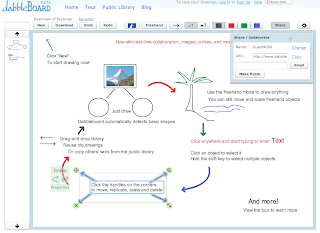
Dabbleboard: New online collaboration tool

Want to think and communicate visually with remote employees? Try Dabbleboard.

Dabbleboard is the latest online whiteboard tool helping teams communicate and share ideas from anywhere in the world. While there are other digital whiteboards out there, the biggest perks with Dabbleboard are how clean drawings come out and the ability to collaborate in real time.

Since most of us are very unskilled when it comes to drawing with a mouse, Dabbleboard recognizes common shapes (circles, lines, boxes, etc.) and redraws them neatly. Real-time collaboration makes it simple for multiple users to be in the program and drawing at the same time.

Dabbleboard produces attractive and easy to share documents. You can type and insert images anywhere on the board, stop working at any time and continue the drawing later by saving it for private or public use. Drawings can be emailed, downloaded in PNG format, or easily shared by sending a URL.

The coolest part - it’s free. So, take the tour and give it a try.

Dabbleboard online collaboration tool

Thursday, August 7, 2008

When employees are talking about you online

Chances are most of your employees are members of popular social networking sites like Facebook, MySpace, Twitter or LinkedIn. They’re publishing and commenting on blogs, and writing reviews on their favorite products.

Employees’ online behavior can pose a serious threat to business. Take the example of the Home Interiors & Gifts employee who spilled the beans about a major pending transaction in a casual email to a friend. The employee meant no harm by sharing the news, but executives were furious.

Earlier this year, CNN caused an uproar after firing Chez Pazienza for his blogging without having a policy regarding “personal writings online” in place. Since then, CNN has written a policy which Pazienza was happy to blog about.

While you may have some sense of control over what employees say about the company over instant messages in the office, how do you guide what employees are saying about the company on their own time, outside of work?

When speaking online as an employee it’s important to have a clear set of rules that everyone in the organization can follow, according to Denise Shiffman at Engage Daily. Everyone is entitled to their own opinion, but companies should train employees on how to act responsibly when talking about their employer online.

Take a look at how the BBC, Sun Microsystems and IBM have put their social media guidelines into writing. After drafting your own policy, Schiffman advises running them through the legal department before passing the document out to employees.

Here are some online behavior guidelines Shiffman would include (read the full list):
  • Use your real name and identify the company you work for.
  • Everyone speaks for themselves, not “on behalf” of the company. Only designated spokespeople speak for the company.
  • Protect confidential and financial company information.
  • Follow the same rules you would if speaking inside of the office.

Writing policies on employees’ actions outside of the office can be a bumpy road to travel. As always, seek out legal advice before publishing any guidelines on employee online behavior outside of work.

Do you think it’s right to have guidelines on employee online behavior while on their own time? What problems have you come across in writing your own company policy?

Tuesday, August 5, 2008

New study reveals instant messaging reduces interruption, plus workplace IM etiquette

If you think instant messaging at work is distracting and lowers employee productivity, think again. A new study from researchers at Ohio State University and University of California, Irvine actually found the exactly the opposite to be true.

Before the study, many researchers and business professionals believed that if given instant messaging, workers would use it on top of emails and phone conversations, increasing interruption and lowering productivity.

Instead, researchers found that workers who used instant messaging on the job reported less interruption than coworkers who did not. Instant messaging was often used as a substitute for the phone and email, decreasing workplace disruption.

“We found that the effect of instant messaging is actually positive. People who used instant messaging reported that they felt they were being interrupted less frequently,” said Ohio State researcher Kelly Garrett in ScienceDaily.

Researchers found that most workers would use instant messaging to see if a coworker was busy, before interrupting them at their desk, and to get quick answers to simple questions. Instant messaging gave employees more control over workplace communication by showing others when they are available or not. It also allows workers to postpone conversations and ignore or dismiss unimportant messages, with little distraction.

If you’re thinking about adopting instant messaging in the office or already use it, be sure to train employees on correct workplace instant messaging etiquette. Here are a few key points to remember:

  • Knock first. Ask if the person is available before interrupting them with a detailed question. Simply ask “Are you available to chat?”


  • Keep it short. Instant messaging is meant to be brief. If your message requires more than about two lines of text, maybe you should consider moving your conversation to the phone or email.


  • Take your time. Your coworker may not be as fast of a typist as you, so give them enough time to respond before sending another question.


  • Use away messages. Going to be in a meeting for the next hour? Put up an away message that tells everyone you’re away from your desk, so everyone knows when you’re available again.


  • Mind your manners. Don’t say anything in an instant message that you wouldn’t put in an office email or say over the phone. Remind employees that IMs sent from office computers should follow workplace communication policies regarding offensive language and improper conversation topics.

How employees choose to use instant messaging will determine the effect it will have on productivity. If everyone agrees to follow a few rules, instant messaging can enhance employee communication, reduce distractions and improve productivity.

Tuesday, June 17, 2008

Video: Training in Second Life

If you find yourself lost when people start talking about Second Life or don’t think you could ever use it as an employee learning tool, there’s help.

Tony Karrer at eLearning Technology compiled a great little collection of Second Life learning videos to give you a sense of what it looks like and how it works. Take a look for some ideas on how it could be used as an effective employee training and development tool.

Here’s one video on some of the educational uses of Second Life, but you can find the full list at eLearning Technology.


For more videos with essential information for trainers, the HR Creations channel on YouTube is another convenient resource. HR Creations shares their personal expertise and has compiled playlists full of videos on topics such as training, employee issues and leadership.

Monday, June 2, 2008

Using Second Life for virtual corporate training and communication

Companies, universities and conference planners are using Second Life technology to connect and train employees and students across the globe. If your company is trying to spice up dull meetings or cut remote employee training costs, Second Life may hold a solution for you.

Jenna Sweeney, author of the Corporate Training & e-Learning Blog, reviewed a Forrester Research report stating that “within five years the 3D Internet will become as important to companies as the Web is today.” While she holds a “wait-and-see attitude” toward that statement, she still believes the technology holds true benefits in the corporate world.

While we still don’t know the depth of the impact Second Life and virtual worlds will have on corporate life, it provides a glimpse into the possibilities of corporate communication in the future.

Right now, the opportunities seem endless – from remote collaboration and employee training to 3D projects and models. Companies like Sun Microsystems, Best Buy and IBM have are a few companies ahead of the game.

Sun Microsystems has been developing real estate in Second Life since 2006. The computer server and software maker owns exactly seven islands, two of which are reserved for the general public. The other five islands are used for corporate training sessions and meetings.

At one corporate event in April, Sun Microsystems corporate executives socialized with hundreds of employees, enjoying Alpine skiing, car racing and jazz music.

Sun held the event after acquiring a software company in order to introduce new employees to existing employees at their home office. Second Life was the best solution.

Sun only has one rule: Employees should show up looking like humans. It doesn’t worry many other companies if employees take the form of animals or other beings while on the clock. (LA Times)

Corporate America is still learning to embrace Second Life, where creative
self-expression is expected.”
IBM, with almost 387,000 employees in 170 countries, uses Second Life and other virtual communities to conduct meetings, train new employees and hold orientation sessions.

Second Life is helping IBM learn how to hold more efficient meetings. If someone wanders off track during a meeting, colleagues can send messages telling that person to get back on track. Salespeople use Second Life to test sales pitches on colleagues, with immediate feedback.

As the IBM spokesperson said in a recent LA Times article, overseeing a virtual workplace can be much more difficult than tracking a real one. When IBM first started using the technology, employees would show up to virtual meetings wearing inappropriate attire or as bizarre creatures. As time went on, the virtual world evolved just as a real community would – after laying down some ground rules, professionalism returned.

If and how the rest of the corporate world will adopt virtual worlds is still up in the air. We would like to hear from you - Does your company use any kind of Second Life or virtual communication tools to foster employee communication?

Brought to you by www.gneil.com